Loading…


Loading…
Loading…
Loading…
OCR GCSE Computer Science · J277
OCR J277 Check the specification (PDF) (opens in a new tab)
A vulnerability is a weakness that an attacker could exploit. It might be a predictable password, a user account with unnecessary permissions or an unlocked room containing a server. Protecting a system involves finding and removing these weaknesses, as well as limiting attacks and their consequences.
Different prevention methods protect different parts of a system. A locked server room protects equipment, but does not check an email attachment for malware. Anti-malware software checks for malicious software, but does not stop someone carrying away a computer. Effective security therefore combines several methods.
Penetration testing is an authorised, simulated attack on a system. An organisation gives testers permission to attempt attacks in a controlled way, so they can discover vulnerabilities before malicious attackers exploit them.
An external test examines whether someone outside the organisation could gain access. An internal test examines what someone with an existing account could access or damage. For example, testers investigating an online shop might check whether its login is vulnerable to password guessing or whether its database can be attacked through SQL injection.
The findings guide improvements. Weak passwords can be replaced, excessive permissions reduced and insecure handling of website input corrected. Testing identifies the weakness; the organisation's follow-up changes remove or reduce it.
A test only examines the system as it exists at that time. New software or changed settings may introduce new weaknesses, so testing needs to be repeated when appropriate.
Anti-malware software scans files and programs for malicious software. It can check stored files, downloads and email attachments, helping to stop malware before it runs and to find malware already on a device.
One detection method compares files with a database of known malware signatures: recognisable patterns associated with malicious software. If a suspicious file is detected, the software can block it, quarantine it or delete it. Quarantining isolates the file so that it cannot run or affect the system.
For example, a malicious email attachment may be detected and quarantined rather than being allowed to infect a school computer. The signature database must be kept up to date because new malware is continually created. A signature-based scanner may miss a new threat that it does not yet recognise.
A firewall checks incoming and outgoing network traffic against configured rules. These rules can specify permitted sources, destinations or services. Traffic that does not meet the rules is blocked.
For example, a school can configure its firewall to reject connections from an unauthorised external source. It can also restrict unwanted outgoing connections. This reduces opportunities for unauthorised network access and can block some malicious traffic.
A hardware firewall can protect traffic entering and leaving a whole network. A software firewall can protect an individual computer. Both apply rules rather than simply assuming that all traffic is safe.
Rules must allow legitimate communication while blocking unwanted traffic. A firewall may still allow a harmful file carried within permitted traffic, so anti-malware provides another layer of protection. Filtering unwanted traffic can help against some denial-of-service attempts, but a firewall does not guarantee protection against every such attack. It also cannot stop a user voluntarily revealing a password in response to phishing.
A password requires someone to know a secret before access is granted. A strong password is long, difficult to predict and uses a mixture of uppercase and lowercase letters, numbers and symbols.
Increasing length and the range of possible characters increases the number of combinations an attacker may need to try. This makes brute-force guessing harder. Limiting repeated failed login attempts, for example by locking an account after several failures, further restricts guessing.
However, a difficult-to-guess password can still be stolen through phishing or malware. Password strength protects against guessing; it does not make every way of obtaining a password impossible.
Once a user has signed in, user access levels determine which files, folders and programs they can use and what actions they can perform.
For a shared school document:
Permissions can also control whether a user may execute, or run, a program. An administrator may have broader permissions to manage accounts and systems.
Giving each user only the permissions needed for their role is called least privilege. It reduces accidental changes and deliberate damage. If a student's account is compromised, restricted permissions limit which data the attacker can reach or alter. The account's password controls entry; its access level limits what happens after entry.
Encryption converts readable data, called plaintext, into unreadable ciphertext using an algorithm and a key. Decryption uses the appropriate key to convert the ciphertext back into readable data.
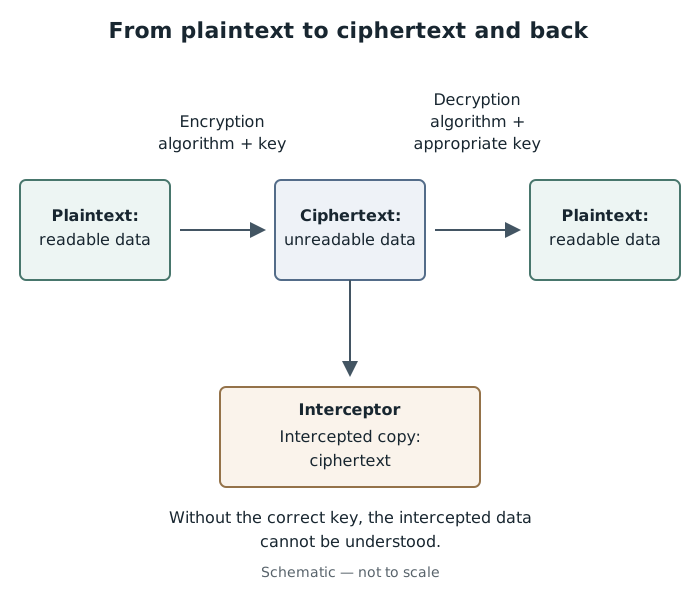
Encryption protects the meaning of data even if an attacker obtains a copy of the ciphertext.
Suppose a school sends confidential records between two sites. If an attacker intercepts the encrypted transmission, they obtain ciphertext rather than readable records. Without the correct key, the data should be meaningless to them. Encryption can also protect stored data if a device or file is stolen.
Encryption protects confidentiality: it stops an unauthorised person understanding the information. It does not stop the data being intercepted, copied or deleted. The key must also be protected; someone who obtains the necessary key may be able to decrypt the data.
Physical security restricts direct access to computers, storage devices and network equipment. Locked server rooms and cabinets prevent unauthorised people from reaching equipment and reduce the risk of theft, damage or the connection of unauthorised devices.
Keycards or biometric entry systems can allow authorised staff through a door while excluding others. A biometric system checks a physical characteristic, such as a fingerprint, against an authorised record. Security staff, CCTV and alarms can help deter intruders, monitor activity or alert staff to a problem.
The measure should match the equipment and risk. A locked server cabinet protects the server and its storage devices, but does not prevent a remote attacker sending a phishing email.
A school records system needs several layers. A firewall filters connections; anti-malware checks uploaded files; strong passwords restrict sign-in; access levels restrict which records each account can use. Encryption protects records during transmission, while physical security protects the on-site server.
Penetration testing checks for weaknesses in these arrangements, allowing the school to correct them. The methods work together because each addresses a different route into the system or limits a different consequence of an attack.
Get unlimited access to all revision notes, key terms, and exam tips.
Penetration testing: authorised simulated attacks identify weaknesses. Act on the findings to remove vulnerabilities; repeat testing as systems change.
Distinction: passwords control signing in; permissions control actions after signing in.
Combine methods to cover different risks. No single control prevents every attack.
Link each method to a particular threat: name the control, explain its action, then explain how that reduces the risk.
Penetration testing identifies vulnerabilities. Explain that the organisation must then fix the weaknesses found.
Distinguish passwords, which control signing in, from user access levels, which control what a signed-in user can do.
Encryption does not prevent interception: it makes intercepted data unreadable without the correct key.
Avoid claiming that any one method prevents every attack. Choose controls that match the situation.
Vulnerability
A weakness in a computer system that an attacker could exploit.
Penetration testing
An authorised, simulated attack on a computer system to identify security weaknesses so they can be corrected.
Anti-malware software
Software that detects malicious software and can block, quarantine or remove it.
Malware signature
A recognisable pattern or characteristic used to identify known malicious software.
Quarantine
Isolation of a suspected malicious file to prevent it from running or affecting the system.
Firewall
Hardware or software that checks incoming and outgoing network traffic against rules and blocks traffic that is not permitted.
User access level
Permissions that determine which resources a user can access and what actions they can perform.
Least privilege
The principle of giving a user only the permissions needed for their role.
Password
A secret sequence of characters entered to gain access to an account or system.
Encryption
The conversion of readable data into unreadable data using an algorithm and a key.
Plaintext
Readable, unencrypted data.
Ciphertext
Data in an unreadable form produced by encryption.
Key
A value used by an encryption or decryption algorithm to transform data.
Physical security
Measures that protect devices, storage media and network equipment from unauthorised physical access, theft or damage.
Put your knowledge into practice — try past paper questions for Computer Science
Vulnerability
A weakness in a computer system that an attacker could exploit.
Penetration testing
An authorised, simulated attack on a computer system to identify security weaknesses so they can be corrected.
Anti-malware software
Software that detects malicious software and can block, quarantine or remove it.
Malware signature
A recognisable pattern or characteristic used to identify known malicious software.
Quarantine
Isolation of a suspected malicious file to prevent it from running or affecting the system.
Firewall
Hardware or software that checks incoming and outgoing network traffic against rules and blocks traffic that is not permitted.
User access level
Permissions that determine which resources a user can access and what actions they can perform.
Least privilege
The principle of giving a user only the permissions needed for their role.
Password
A secret sequence of characters entered to gain access to an account or system.
Encryption
The conversion of readable data into unreadable data using an algorithm and a key.
Plaintext
Readable, unencrypted data.
Ciphertext
Data in an unreadable form produced by encryption.
Key
A value used by an encryption or decryption algorithm to transform data.
Physical security
Measures that protect devices, storage media and network equipment from unauthorised physical access, theft or damage.
Get unlimited access to all revision notes, key terms, and exam tips.