

Loading…
Loading…
Loading…
Edexcel GCSE Computer Science · 1CP2
Edexcel 1CP2 · 2.2.2 Check the specification (PDF) (opens in a new tab)
A bitmap image represents a picture as a rectangular grid of small elements called . A digital photograph is a familiar example. Each pixel has one colour; the pattern of differently coloured pixels forms the picture. At normal viewing size, the pixels are often too small to notice individually.
A computer stores each pixel’s colour as a binary code: a sequence of bits, each of which is 0 or 1. To display the image, it interprets these codes and gives the corresponding pixels their colours.
Consider a simple black-and-white image. Only two colours are needed, so one bit can represent each pixel. Suppose we choose 0 = black and 1 = white. These assignments are a chosen mapping, not a universal rule.
For an image four pixels wide, the binary sequence 0110 describes a row containing a black pixel, two white pixels and another black pixel. The next four bits describe the next row. Repeating this process builds the whole image.
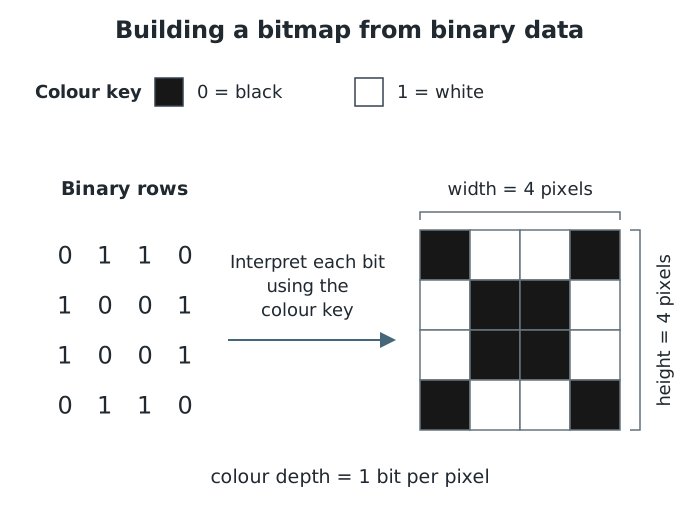
Each group of four bits forms one row. With one bit per pixel, this 4 × 4 bitmap uses 16 bits of pixel data.
The computer also needs information about how to interpret the bits. Metadata is additional data describing the image, such as its width, height and colour depth. The width tells it where each row ends, while the colour depth tells it how many bits belong to each pixel. Other metadata can record details such as when a photograph was taken.
An image’s dimensions are expressed as width × height in pixels. An image measuring 500 × 500 pixels contains 250,000 pixels. One measuring 1,000 × 1,000 pixels contains 1,000,000 pixels: four times as many, because both dimensions have doubled.
Resolution concerns the pixels used to represent an image. More pixels can record finer detail, such as the edges of letters or individual strands of hair. When comparing images displayed at the same physical size, an image with more pixels generally looks sharper.
Pixel density can also be expressed in pixels per inch (ppi): the number of pixels packed into each inch when the image is displayed or printed.
Enlarging an existing bitmap does not automatically add genuine detail. Its existing pixels are spread over a larger area, and the picture can look blocky. This is called pixelation.
Colour depth is the number of bits used to represent each pixel’s colour. More bits provide more different binary combinations, allowing more colours to be represented.
With two bits per pixel, the possible codes are 00, 01, 10 and 11. These could represent black, dark grey, light grey and white. Each pixel now needs two bits rather than one.
The number of possible colours is:
| Colour depth | Possible colours |
|---|---|
| 1 bit | 2 |
| 2 bits | 4 |
| 4 bits | 16 |
| 8 bits | 256 |
| 24 bits | 16,777,216 |
A greater colour depth can represent more subtle colour differences and smoother changes in shading. It does not increase the number of pixels: resolution and colour depth describe different properties.
A bitmap’s pixel data depends on both the number of pixels and the bits stored per pixel.
Increasing resolution means storing more pixel colour codes. Increasing colour depth means storing more bits in every code. Either change increases the storage needed for the pixel data, if other factors remain unchanged.
For uncompressed pixel data:
This describes the pixel data rather than any additional metadata. Higher resolution and colour depth can improve the representation of a detailed photograph, but require more storage. A simple black-and-white symbol may not need the same range of colours.
Width and height are measured in pixels; colour depth is measured in bits per pixel. More pixels or more bits per pixel require more storage.
Distinguish resolution from colour depth: resolution concerns pixels; colour depth is the number of bits per pixel.
Use 2 raised to the colour depth to find the number of possible colours, not colour depth multiplied by 2.
Explain storage changes using their cause: more pixels means more colour codes; greater colour depth means more bits in each code.
Do not assume that 0 always means black. Use the colour mapping given in the question.
It can see this note and what your specification asks for.
Answers are free with an account.
1 free note left this week
Get more free notesYour answer sets when this note comes back for review, or marks it complete.
Was this note helpful?
Log in to tell us whether it helped, or to report a problem.
Last updated
Bitmap image
A digital image represented as a grid of pixels, with each pixel’s colour stored using binary data.
Pixel
The smallest individual element of a bitmap image. Each pixel has a single colour.
Resolution
The number of pixels used to represent an image, commonly expressed as its width × height in pixels. Pixel density describes how closely pixels are packed when displayed or printed.
Colour depth
The number of bits used to represent the colour of each pixel. A colour depth of bits allows up to different colours.
Metadata
Additional data describing other data. For a bitmap image, this can include its dimensions and colour depth.
Pixelation
The blocky appearance that can occur when a bitmap image is enlarged enough for its individual pixels to become noticeable.
Put your knowledge into practice — try past paper questions for Computer Science
Bitmap image
A digital image represented as a grid of pixels, with each pixel’s colour stored using binary data.
Pixel
The smallest individual element of a bitmap image. Each pixel has a single colour.
Resolution
The number of pixels used to represent an image, commonly expressed as its width × height in pixels. Pixel density describes how closely pixels are packed when displayed or printed.
Colour depth
The number of bits used to represent the colour of each pixel. A colour depth of bits allows up to different colours.
Metadata
Additional data describing other data. For a bitmap image, this can include its dimensions and colour depth.
Pixelation
The blocky appearance that can occur when a bitmap image is enlarged enough for its individual pixels to become noticeable.