

Loading…
Loading…
Loading…
AQA GCSE Computer Science · 8525
AQA 8525 Check the specification (PDF) (opens in a new tab)
A bitmap is a digital image made from a grid of . Each pixel has a colour, and the stored binary data tells the computer which colour to display at each position. Converting binary data into a bitmap means using those colour codes to fill the grid, one pixel at a time.
For a simple black-and-white image with a colour depth of 1 bit, each pixel is represented by one binary digit: either 0 or 1. These two values can represent the two colours. In the example below, the colour key is 0 = black, 1 = white.
The codes describe colours, not a number to convert into denary. For example, 0101 describes four separate pixels: black, white, black, white.
Consider this binary pattern, with each line representing one row of pixels:
0101
1010
0101
1010
0101
There are four bits in each row and one bit per pixel, so the image is four pixels wide. There are five rows, so it is five pixels high. Draw a grid with four columns and five rows. Each square represents one pixel.
Start at the top-left pixel. Read the first row of data from left to right, filling one square for each bit:
0, so shade the first square black.1, so leave the second square white.0 and 1, make the third square black and the fourth white.Then move to the leftmost square of the second row. Its data is 1010, so this row becomes white, black, white, black. Continue across each row, working from the top of the grid to the bottom.
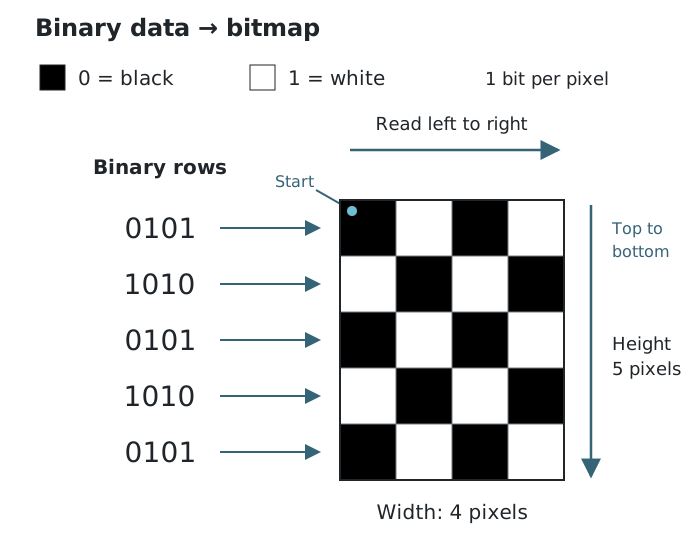
Each row of four bits fills one row of four pixels, using 0 for black and 1 for white.
The completed image is a checkerboard pattern. Rows one, three and five start with black; rows two and four start with white. Every bit has been used once, and every grid square has a colour.
Sometimes the data is supplied without line breaks. Use the given image width to identify where each row ends. For a one-bit image four pixels wide, take the first four bits as the top row, the next four as the second row, and continue in groups of four.
The row boundaries matter: they determine where each pixel belongs. After filling the grid, check each row against its corresponding data, using the colour key to confirm every square.
For a 1-bit image, one bit represents one pixel.
If each line represents one row, bits per line give the width of a 1-bit image; the number of lines gives its height.
For continuous data, split it into rows using the given width.
Check the colour key given in the question rather than assuming that 0 always means black.
Keep width and height distinct: width is the number of columns; height is the number of rows.
At the end of each row, return to the left-hand side of the next row. Do not continue down a column or reverse direction.
Shade each required pixel fully and keep the grid boundaries clear.
It can see this note and what your specification asks for.
Answers are free with an account.
1 free note left this week
Get more free notesYour answer sets when this note comes back for review, or marks it complete.
Was this note helpful?
Log in to tell us whether it helped, or to report a problem.
Last updated
Bitmap
A digital image made from a grid of pixels, with binary data representing the colour of each pixel.
Pixel
An individual picture element in a digital image, with a single colour.
Bit
A binary digit, either 0 or 1.
Colour depth
The number of bits used to represent the colour of each pixel.
Put your knowledge into practice — try past paper questions for Computer Science
Bitmap
A digital image made from a grid of pixels, with binary data representing the colour of each pixel.
Pixel
An individual picture element in a digital image, with a single colour.
Bit
A binary digit, either 0 or 1.
Colour depth
The number of bits used to represent the colour of each pixel.